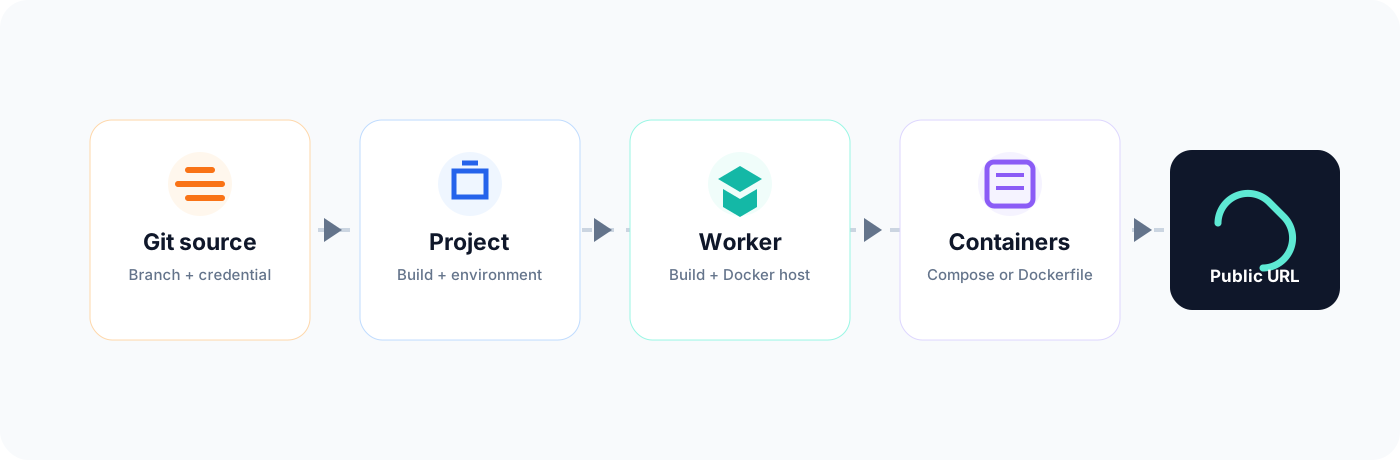
Go from a Git repository to a running, observable Docker service with an optional public URL.
The worker performs Git, Docker and ngrok operations and returns results to the panel.
Requirements
A Docker host, an online claimed worker, a Git repository with a Compose file or Dockerfile, and provider credentials for private repositories.
Deployment workflow
1
Prepare a worker
Start and claim a worker on the Docker host. Confirm that it appears online.
2
Add Git access
For a private repository, create a credential available to the project owner.
3
Register the project
Enter alias, repository URL and branch, then Register or Clone on a worker.
4
Configure Build
Select Compose or Dockerfile and enter only the fields relevant to that mode.
5
Set environment
Add runtime variables and select the default worker for this project.
6
Configure public access
Optionally save an ngrok token, enable Public URL and select a domain.
7
Deploy
Click Deploy and follow the deployment event until the worker reports completion.
8
Verify
Inspect containers and logs, test the endpoint and close unused public URLs.
Docker Compose checklist
The Compose path is relative to the repository root.
Services have valid image or build configuration.
Required networks and volumes can be created on the host.
The selected service and internal port identify the application.
Public services are reachable from the worker.
docker compose -p <project> -f <compose-file> up -d --build
Dockerfile checklist
The Dockerfile remains inside the repository.
The build context contains all COPY sources.
The application listens on 0.0.0.0.
Ports use host:container form, for example 8080:80.
The managed container name has no collision.
What happens after Deploy
The selected worker synchronizes the configured Git source.
It builds the Compose services or Dockerfile image.
It starts or recreates the application containers.
The deployment reports completion or shows an actionable error.
If public access is enabled, the configured service receives a public URL.
Post-deployment verification
Confirm expected containers appear in Deployments.
Check status and published ports.
Open logs and verify application startup.
Test the local or public endpoint.
Confirm ngrok targets the intended service.
Close public URLs when no longer required.
Stop, retry and recover
Use Stop project to stop the stack or managed container. Correct Git or Build settings, synchronize and deploy again. Use Restart only when source and configuration have not changed.
Preserve diagnostics
Read deployment events and container logs before deleting failed containers or cleaning worker state.